Thursday, May 22, 2014

Another shitty day with maven, m2e and eclipse

Please, don't get the idea from the title that I don't like java. It's quiet the contrary; however, sometimes one does get  little annoyed when it's not possible to be productive because one has to constantly trouble shoot little issues, which to say is at least possible with java because of its open source nature. Actually, these "little issues" are rarely related to the core java technology but the trendy stuff which pops up and is programmed with java and everybody is expected to use.

With that said, all I wanted to do is snoop/debug around in the spring security classes a little. I already have some projects (both mavenized and not mavenized in both netbeans and eclipse), which are working, but I wanted to start from scratch and do everything with eclipse kepler and not STS, which I thought would be easy. 

So I started and 2 days later I finally had it. Yes, I let myself be distracted by unnecessarily delving into code, which I didn't need to delve into, and read a lot about maven; it was all very interesting but probably not so productive.

First, I generated a basic web application using the maven archetype: "maven-archetype-webapp" as shown here:

mvn archetype:generate -DgroupId={your-groupid} -DartifactId={your-project-name} -DarchetypeArtifactId=maven-archetype-webapp -DinteractiveMode=false

(See here for yesterday's trials and tribulations).

Next, I imported the newly created project into Eclipse and added the necessary Spring dependencies to the pom so that it looked like this:


So far so good. 

Then I thought I could setup tomcat up in Eclipse and run my newly imported project from within eclipse as shown below:


This works as long as there are no dependencies beyond those provided by the j2ee environment; however, with Spring it wouldn't work. I always got a 404, which was obvious because I could see that the Spring  libraries weren't be deployed into the folder specified by the wtp.deploy JVM argument.

So I screwed around for a couple of hours playing with the project's facets. I tried to get the "Dynamic Web Module" facet (see red ellipse below)  set to version 3.0, which, in the end, was a real adventure. See here about how do it.

http://stackoverflow.com/questions/18122336/cannot-change-version-of-project-facet-dynamic-web-module-to-3-0


Once I finally got it set to version 3.0, then it was just as hard to get the "Further configuration available..." option to appear (See red below) at the bottom of the facet's screen dialog.


It finally appeared after I tinkered around with the Java version number and closed the dialog and reopened it a few times.

Anyway, all the work with the facets was a waste of time and I knew it because I was straddling the grey area between maven and eclipse. The thing to do, which I originally wanted to avoid, was to use the maven-tomcat-plugin, which didn't seamlessly work either.

<plugin>
<groupId>org.apache.tomcat.maven</groupId>
<artifactId>tomcat7-maven-plugin</artifactId>
<version>2.1</version>

</plugin> 

Now, begins a new series of trials and tribulations; however, this time with the maven-tomcat-plugin. The first error was:

[ERROR] Failed to execute goal org.apache.maven.plugins:maven-compiler-plugin:3.1:compile (default-compile) on project mycrazyapp: Compilation failure
[ERROR]/C:/Projekte/spring/workspaces/blogws/mycrazyapp/src/main/java/org/springframework/security/samples/config/SecurityConfig.java:[10,8] cannot access javax.servlet.Filter
[ERROR] class file for javax.servlet.Filter not found

I tried to add in necessary dependency using the m2e plugin but got this error:


See here:
http://stackoverflow.com/questions/18047843/cannot-search-for-artifact-in-eclipse-kepler-using-m2e-plugin

The above fix didn't work for me, so I just added it in manually.

<dependency>
<groupId>javax.servlet</groupId>
<artifactId>servlet-api</artifactId>
<version>2.5</version>
<scope>compile</scope>
</dependency>

The addition of the servlet-api jar caused this:

java.util.concurrent.ExecutionException: org.apache.catalina.LifecycleException: Failed to start component [StandardEngine[Tomcat].StandardHost[localhost].StandardCon
text[/mycrazyapp]]

Caused by: java.lang.LinkageError: loader constraint violation: loader (instance of org/apache/catalina/loader/WebappClassLoader) previously initiated loading for a d
ifferent type with name "javax/servlet/ServletContext"

Which was fixed by changing my pom dependency declaration's scope of the servlet-api to" provided".

<dependency>
<groupId>javax.servlet</groupId>
<artifactId>servlet-api</artifactId>
<version>2.5</version>
<scope>provided</scope>
</dependency>


Ran maven again.

mvn tomcat7:run


Ok, almos there. Here, I thought that maybe I needed to change the maven-compiler-plugin configuration to include debugging information. I looked but it's default is to include debugging information.

This is similiar but the reverse of what I need.


Found this, so I added it; however, that still didn't fix it.


<configuration>
               <source>1.7</source>
               <target>1.7</target>
               <debug>true</debug>
</configuration>
I screwed around for a while and tried miscellaneous settings within eclipse even though I knew eclipse wasn't responsible for the compiling.

Eventually, I got the idea to do this:

mvnDebug tomcat7:run
Preparing to Execute Maven in Debug Mode
Listening for transport dt_socket at address: 8000

from here:

And Voila!


But I still got the error about "line numbers" before stepping into my source code. I think it's because the debugger first stops in the  dynamically generated cglib proxy code; however, it 's tolerable.

Tuesday, May 20, 2014

crude schematic of maven lifecycle

Build Lifecycle Basics

There are three built-in build lifecycles. 

Each of these build lifecycles is defined by a different list of build phases. (blue text is debug output):

default build lifecycle

[DEBUG] Lifecycle default -> [validate, initialize, generate-sources, process-sources, generate-resources, process-resources, compile, process-classes, generate-test-sources, process-test-sources, generate-test-resources, process-test-resources, test-compile, process-test-classes, test, prepare-package, package, pre-integration-test, integration-test, post-integration-test, verify, install, deploy]


clean build lifecycle

[DEBUG] Lifecycle clean -> [pre-clean, clean, post-clean]

site build lifecycle

[DEBUG] Lifecycle site -> [pre-site, site, post-site, site-deploy]

More about lifecycles can be found here: 
http://maven.apache.org/ref/3.2.1/maven-core/lifecycles.html


How to get maven to list all available goals of the installed plugins:

help:describe -DgroupId=org.apache.maven.plugins  -DartifactId=maven-war-plugin  -Ddetail=true


Monday, May 19, 2014

eclipse maven-archetype-webapp tomcat


This blog post shows a step-by-step demonstration of how to create a simple maven based j2ee web application within eclipse using the m2e plugin. 

Before beginning, it might interest the reader to know that the lengthy process I'm about do describe can be circumvented by using the maven command, shown below, from the command line and importing the resulting pom into eclipse. 

mvn archetype:generate -DgroupId={your-groupid} -DartifactId={your-project-name} DarchetypeArtifactId=maven-archetype-webapp -DinteractiveMode=false

For this demo, you shall need:

Eclipse (kepler) with the maven m2e plugin and a stand alone instance of Tomcat (7+).


Create a new project using the File->New->Project... menu.


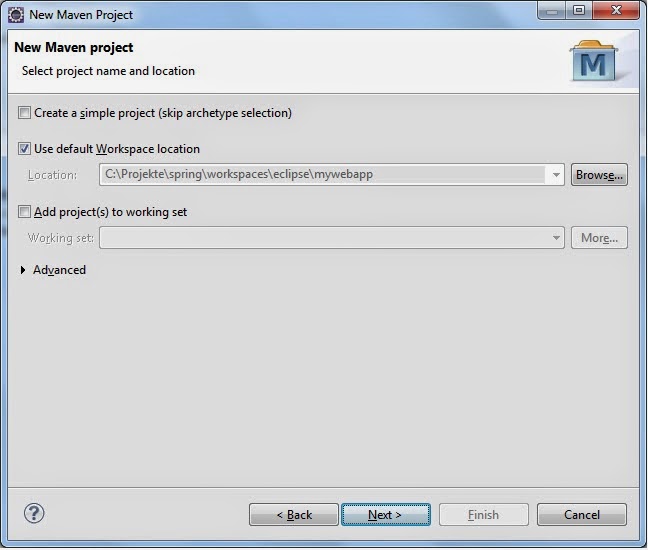
Select the "Maven Project" wizard.


Select project type and location as show below.


Select the archetype with a group id of: org.apache.maven.archetype and artifact id of: maven-archetype-webapp.


Create a group id and artifact id for your own project.


After pressing finish, it should be possible to see the newly created maven project in eclipse's project explorer as shown below:


Now associated the project with a sever so that you can run it from within eclipse by right clicking the new project and selecting "Run on Server" from the "Run As" menu.


Press finish and with some luck...


Google appengine devserver NoClassDefFoundError "is a restricted class"

While trying to migrate an Eclipse Appengine project to a Maven one, I ran into a NoClassDefFoundError exception when starting the DevAppServerMain (com.google.appengine.tools.development) via the appengine-maven-plugin using appengine version (1.9.4) . 

The same project would run when started within Eclipse when using the Eclipse Appengine plugin but not when started using the Maven one; neither within Eclipse nor on the command line. Every time, I got the same error:

HTTP ERROR 500
Problem accessing /_ah/admin. Reason:    javax.servlet.FilterChain is a restricted class. Please see the Google  App Engine developer's guide for more details. 

I worked on this problem for a long time. Delved into the DevAppServerMain code, the appengine-maven-plugin code, java agents and lots of other things but could not solve the issue. Eventally, I solved it by complete coincidence. 

In my efforts to find the cause, I had created a Maven project using the the following archetype: com.google.appengine.demos:guestbook-archetype. I imported it into Eclipse as a Maven project using the pom and then ran the appengine:devserver goal, which started; however, when I ran it from the command line it didn't. When I compared the two, I saw that they were using different Java installations: The one that would not work properly was running with with:

set JAVA_HOME=c:\Program Files (x86)\Java\jdk1.7.0_40

and the one that worked with:

set JAVA_HOME=c:\Program Files\Java\jdk1.7.0_25

In summary: It had to do with the Jdk. Why still needs to be determined.

Thursday, April 17, 2014

Oracle 11g Database not registering with listener

I have two instances of an Oracle database installed on a Unix zone. Unfortunately, one of them won't register with the listener when it starts.

In the $ORACLE_HOME/dbs folder I found a file called inittstep.ora, which was the init file for the working database. In it, I found:  *.local_listener='LISTENER.tst.tadnet.net'
In the file for the non-working database, I found a similar entry but it was different so I changed it to contain the value found in the good file; however, this still didn't help.

I started the database and tried this:

SQL> show parameter local_listener

alter system set LOCAL_LISTENER='LISTENER.tst.tadnet.net' scope=both

and it worked.

See:
http://edstevensdba.wordpress.com/2011/07/30/exploring-the-local_listener-parameter/


Saturday, April 12, 2014

Setting up a Maven GWT project in Eclipse with the GWT Maven Plugin

This how-to assumes that you have the GWT Maven Plugin.

In Eclipse, choose File -> New -> Other and select a wizard, and select "Maven Project"


Here do nothing. Just press "Next"


Type in "gwt" and select the "gwt-maven-plugin" Artifact id.


Enter the appropriate archetype parameters. Here: org.wmmnpr and mykita


The new maven project should have the following structure.

To correct the project errors modify the"pom.xml". In this example the gwt.version, maven.compiler.source and maven.compiler.target had to be set to 2.6.0, 1.7 and 1.7 respectively. Also embedd the build.plugin XML element within a pluginManagement element as follows:

 <build>
    <outputDirectory>war/WEB-INF/classes</outputDirectory>
    <pluginManagement>
    <plugins>
.
.
    </plugins>
    </pluginManagement>
Run from the context menu: Maven->Update Project ...


The error should disappear.

From the context menu, select "Run As" -> "Run Configurations..."

In "Goals" type "gwt:compile"


If the following error occurs, then
[ERROR] Failed to execute goal org.codehaus.mojo:gwt-maven-plugin:1.2.jboss:compile (default-cli) on project mykita: Execution default-cli of goal org.codehaus.mojo:gwt-maven-plugin:1.2.jboss:compile failed: A required class was missing while executing org.codehaus.mojo:gwt-maven-plugin:1.2.jboss:compile: org/codehaus/plexus/util/xml/XmlStreamReader

Change the version of the gwt-maven-plugin to 2.6.0 and run it again.

        <groupId>org.codehaus.mojo</groupId>
        <artifactId>gwt-maven-plugin</artifactId>
        <version>2.6.0</version>

In the "Run Configuration" set-up, change the goal to gwt:run and press the "Run" button.


Here, select "Launch Default Browser" to see the application.


Wednesday, April 2, 2014

Spring IoC and PropertyEditors

Built-in PropertyEditor implementations

Spring IoC uses the concept of PropertyEditors to effect the conversion between an Object and a String. Below is a properties file containing values, which exist as strings and a Bean, which will be injected with the values.

/********* properties file begin  ***********/

threadPoolTaskExecutor.maxPoolSize=10
threadPoolTaskExecutor.running=true

/********* properties file end***********/

In a Bean, I have the following:
/********* bean begin  ***********/
    private Boolean running;

    public Boolean isRunning() {
        return running;
    }

    @Value("${threadPoolTaskExecutor.running}")
    public void setRunning(Boolean running) {
        this.running = running;
    }
/********* bean end ***********/

To convert the "running" attribute from a String to a Boolean Spring uses by default its CustomBooleanEditor class. To allow more elaborate conversion one can  register additional custom PropertyEditors describe in the spring reference manual. Below is summary of the possibilities taken from the manual.

When setting bean properties as a string value, a Spring IoC container ultimately uses standard JavaBeans PropertyEditors to convert these Strings to the complex type of the property. Spring preregisters a number of custom PropertyEditors (for example, to convert a classname expressed as a string into a real Class object). Additionally, Java's standard JavaBeans PropertyEditor lookup mechanism allows a PropertyEditor for a class simply to be named appropriately and placed in the same package as the class it provides support for, to be found automatically.

If there is a need to register other custom PropertyEditors, there are several mechanisms available. The most manual approach, which is not normally convenient or recommended, is to simply use the registerCustomEditor() method of the ConfigurableBeanFactory interface, assuming you have a BeanFactory reference. Another, slightly more convenient, mechanism is to use a special bean factory post-processor called CustomEditorConfigurer. Although bean factory post-processors can be used with BeanFactory implementations, the CustomEditorConfigurer has a nested property setup, so it is strongly recommended that it is used with the ApplicationContext, where